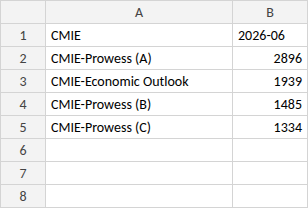
CELUS is able to process usage data from CMIE. CMIE does not provide a downloadable usage report – the monthly usage statistics come as a table embedded in an email. Copy the numbers from the email into the CELUS template and upload it as a .xlsx file. Please do not differ from this format.
How to fill in the template:
- Download the template file below.
- Keep "CMIE" in cell A1 and write the month of the data in cell B1 in the format YYYY-MM (e.g. 2026-06).
- From row 2 down, write the product name in column A exactly as it appears in the CMIE email (e.g. CMIE-Prowess (A), CMIE-Economic Outlook) and the number of reports downloaded in column B.
- Save the file as .xlsx (one file per month).
- Upload to CELUS.
and upload it to CELUS.
Please ensure the report matches the sample exactly, including the following details:
- The data must be arranged in the same columns and rows as in the template
- The header must be identical to the one in the template
- All formatting, spacing, and alignment must be consistent with the template
This is what the template file looks like: