Business & Finance

Frost & Sullivan

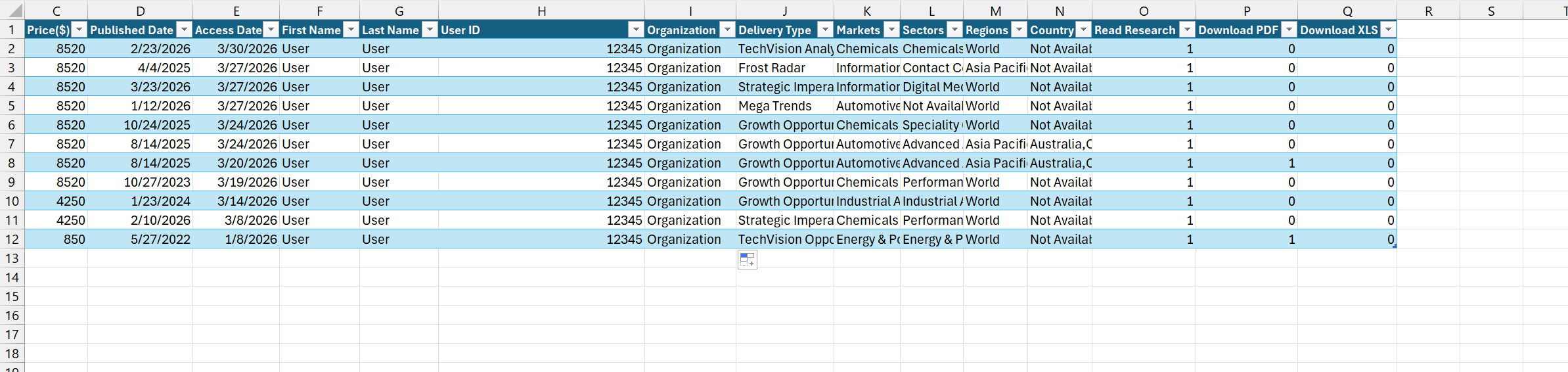
Please make sure the report matches the sample exactly, including the following details:
  • The data must be arranged in the same columns and rows as in the sample.
  • The header must be identical to the one in the sample.
  • All formatting, spacing, and alignment must be consistent with the sample.

CELUS is able to process the usage report from Frost & Sullivan. Upload the .xlsx file as you received it from Frost & Sullivan. CELUS reads the sheet named "Data" (one row per accessed research report), so please do not rename this sheet or change its column headers.

Each row is counted in the month of its Access Date. Read Research is imported as Articles Read, and Download PDF and Download XLS are added together as Downloads. If the upload fails, delete all sheets except "Data" and upload the file again.

The expected file format(s):
.xlsx
This is what the report should look like:
Download the template fileDownload the second template fileDownload sample reportDownload sample report 2Download sample report 3Download sample report 2Download sample report 2Download sample report 2